Offpage AI Skill
Book backlinks, brand mentions and listicles on 170+ niche sites straight from your Claude chat. German-language publishing network.
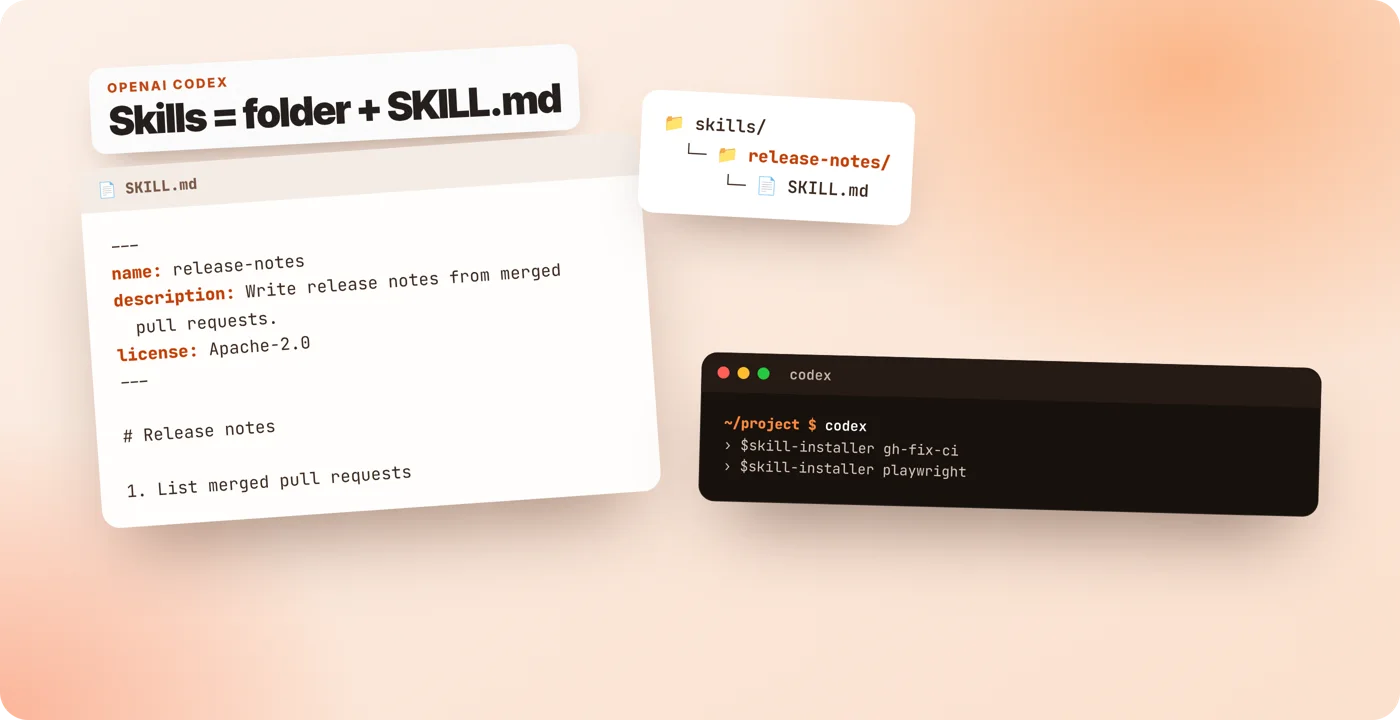
A Codex skill is a folder with a SKILL.md file that tells Codex how to do one job, and you install one by typing $skill-installer followed by its name or a GitHub folder URL. Below you get open-source skills with copy-ready commands, a SKILL.md template and fixes for skills that Codex does not pick up.
Every OpenAI and Anthropic skill here is open source under Apache-2.0. Click Copy and paste the command into Codex. Skills from Answer the Web are tested in Claude Code and not yet tested in Codex.
Book backlinks, brand mentions and listicles on 170+ niche sites straight from your Claude chat. German-language publishing network.
The site-building and traffic method from 2,000+ projects as a skill: strategies, templates and quality checks for your AI.
Pinterest as a traffic channel: pin templates, board structure and a posting plan, automated with your AI.
Find, check and catch expired domains in the chat, with a drop-catching playbook from pending delete to catch.
Reads the review comments on your open GitHub pull request with the gh CLI and works through them.
$skill-installer gh-address-commentsInspects failing GitHub Actions checks on a pull request, summarizes the logs and proposes a fix.
$skill-installer gh-fix-ciDrives a real browser from the terminal: navigate, fill forms, take screenshots, extract data.
$skill-installer playwrightLanguage-specific security review with secure-by-default guidance for the code you are writing.
$skill-installer security-best-practicesCreates and edits Jupyter notebooks for experiments, analyses and tutorials.
$skill-installer jupyter-notebookCaptures desktop or window screenshots when the task needs a visual check.
$skill-installer screenshotReads and updates Linear issues and projects. Needs the Linear MCP server.
$skill-installer linearGuides you through building a Model Context Protocol server, from tool design to evaluation.
$skill-installer https://github.com/anthropics/skills/tree/main/skills/mcp-builderTests local web apps with Playwright: start the server, click through, capture logs and screenshots.
$skill-installer https://github.com/anthropics/skills/tree/main/skills/webapp-testingBuilds distinctive, production-grade frontend interfaces instead of template-looking UI.
$skill-installer https://github.com/anthropics/skills/tree/main/skills/frontend-designCreates new skills and improves existing ones, including descriptions that trigger reliably.
$skill-installer https://github.com/anthropics/skills/tree/main/skills/skill-creatorGenerative art with p5.js: seeded randomness, flow fields, particle systems.
$skill-installer https://github.com/anthropics/skills/tree/main/skills/algorithmic-artNo skill matches your search.
Sources: github.com/openai/skills (the repository now points to openai/plugins for new work) and github.com/anthropics/skills, checked 06.11.2026. The Anthropic document skills (docx, pdf, pptx, xlsx) are source-available, not open source, so they are not listed.
Codex ships a built-in installer skill. Type the installer with the name of a curated skill, or with the URL of any GitHub folder that contains a SKILL.md. Codex downloads the folder and detects the new skill automatically; if it does not appear, restart Codex.
$skill-installer playwrightTo install by hand, copy the skill folder into one of the folders Codex scans: .agents/skills inside your repository for a project skill, or ~/.agents/skills for every project on your machine.
mkdir -p ~/.agents/skills && cp -r ./my-skill ~/.agents/skills/Use a skill by typing /skills and picking it, by mentioning it with $ and its name, or just by describing the task. Codex compares your request with each description and loads the matching skill.
A skill needs one file. The header between the two lines of three dashes holds the name and a description that says what the skill does and when to use it. Codex requires both fields. The body holds the steps. Keep it short and concrete; put long reference material into a references folder next to the file.
---
name: release-notes
description: Write release notes from merged pull requests. Use when the user asks for release notes, a changelog or a summary of recent merges.
license: Apache-2.0
---

# Release notes

1. List merged pull requests since the last tag with `gh pr list --state merged`.
2. Group them into features, fixes and maintenance.
3. Write one plain-language line per change and link the pull request.
4. Put breaking changes at the top.
Save it as .agents/skills/release-notes/SKILL.md. Optional folders: scripts for code the skill runs, references for documents it reads on demand, assets for templates, and agents/openai.yaml for Codex-specific settings.
Both tools follow the same open format, so the differences are small but they matter when a skill does not load.
| Topic | Codex | Claude Code |
|---|---|---|
| Project folder | .agents/skills | .claude/skills |
| User folder | ~/.agents/skills (installer: ~/.codex/skills) | ~/.claude/skills |
| Required header | name and description | none, all fields optional |
| Run a skill | /skills, $name or by description | /skill-name or by description |
| Turn off | [[skills.config]] enabled = false in config.toml | remove or move the folder |
For one skill that works in both, use only the standard fields name, description, license, compatibility, metadata and allowed-tools, and keep the folder name equal to the name field. Comparing the tools themselves? Read our Codex vs Claude Code comparison (German) or browse the Claude Skills hub.
Sources: OpenAI: build skills, OpenAI: Codex skills, Anthropic: Claude Code skills, openai/codex issue 15136, OpenAI community threads 1379522, 1381921 and 1374491, all checked 06.11.2026.
A Codex skill is a folder with a SKILL.md file. The file starts with a short header that holds a name and a description, followed by instructions. Codex reads the description, decides when the skill fits a task and loads the full instructions only then. Optional folders hold scripts, references and assets.
Codex scans .agents/skills from your current folder up to the repository root, then $HOME/.agents/skills for your user, /etc/codex/skills for admins, plus the built-in system skills. Symlinked folders are followed. The skill installer writes to $CODEX_HOME/skills, which is ~/.codex/skills by default.
Type /skills to pick one, mention it with $ followed by its name, or simply describe the task. Codex matches the task against each skill description and loads the right skill on its own. New skills are picked up automatically; if one does not show up, restart Codex.
Usually yes. Both tools read the same SKILL.md format. Codex requires the name and description fields, while Claude Code treats every header field as optional. If you stick to the open standard fields (name, description, license, compatibility, metadata, allowed-tools), one skill folder works in both tools.
Add a [[skills.config]] entry with the path of the skill and enabled = false to ~/.codex/config.toml. The folder stays where it is, Codex just stops loading it. Remove the entry to turn it back on.
More from Answer the Web: home · Claude Code statusline builder · Offpage AI Skill · Google Traffic Box
Answer the Web is not affiliated with OpenAI or Anthropic.
 Deine Wahl
Diese Seite misst Besuche mit Google Analytics, wenn du zustimmst. Ohne Zustimmung wird nichts geladen. Datenschutz